---
title: "Administrative and Statistical Divisions in Brazil"
date: "2024-04-19"
description: "In this post I present the main administrative and statistical subdivisions of the Brazilian territory. All information comes from IBGE, the official statistical bureau. I also show how to easily interpolate data from these shapefiles to custom statistical grids such as Uber's H3 hexagons."
categories: ['brazil', 'maps', 'data-science', 'data-visualization', 'ggplot2', 'english']
format:
html:
code-tools: true
code-fold: true
execute:
message: false
warning: false
---
# Overview
```{r setup, include=FALSE}
knitr::opts_chunk$set(
fig.align = "center",
fig.width = 9,
fig.height = 9,
out.width = "90%",
dev = "svg",
dpi = 72
)
library(geobr)
library(sf)
library(leaflet)
library(dplyr)
library(tidyr)
library(purrr)
library(stringr)
library(ggplot2)
library(patchwork)
library(showtext)
library(MetBrewer)
library(h3)
library(areal)
font_add_google("Lato", "Lato")
showtext_auto()
theme_vini <- ggthemes::theme_map(base_family = "Lato") +
theme(
legend.position = "none",
plot.title = element_text(hjust = 0.5, size = 12, color = "gray10")
)
```
Brazilian geographical hierarchy comprises several fundamental concepts. From an administrative standpoint, the smallest delineations are either zip code areas or neighborhoods. While zip codes offer greater precision, their accessibility in terms of shapefiles is limited. Therefore, our focus primarily lies on neighborhoods.
Moving up the hierarchy, we encounter cities (also referred to as municipalities), metropolitan regions, states (including the Distrito Federal), regional divisions, and the entirety of the country. As of 2022, Brazil is composed of 5,568 cities, 77 metropolitan regions plus 1 RIDE, 26 states, and 5 regional divisions.
From a statistical perspective, the Brazilian Institute of Geography and Statistics (IBGE) delineates three other crucial spatial units: census tracts (setores censitários), weighting areas (áreas de ponderação), and the statistical grid. Finally, there are also other sets of cities, that are more specially defined than typical metropolitan regions:
- Population arrangements (*arranjos populacionais*): a grouping of two or more municipalities where there is a strong *population integration due to commuting* for work or study, or due to contiguity between the main urbanized areas.
- Urban Concentration areas (concentracoes urbanas): isolated cities or population arrangements with over 100,000 inhabitants.
- Meso Regions and Micro Regions:
- Intermediate Regions and Imediate Regions:
Additionally, there are other noteworthy spatial delineations, such as the Unidades de Desenvolvimento Humano, introduced by the Institute for Applied Economic Research (IPEA) in a 2013 study, and the Origin-Destination Zones, utilized by Metro to segment the São Paulo metropolitan region.
In summary,
**Administrative Divsions**
- Macro Regions
- States
- Metropolitan Regions
- Cities
- Neighborhood
- Districts and subdistricts
- Zip-code area
**Statistical Division**
- Weighting Areas
- Census Tracts
- Statistical Grid
## Administrative Divisions
To illustrate the above shapes consider the city of **Curitiba**. Curitiba is the capital city of the state of Paraná and the 8th most populous capital in Brazil and also the 8th smallest capital which helps keep the maps smaller. The state of Paraná is also relatively small.
Importing these shapefiles into `R` is made very easy thanks to the excellent [`geobr` package](https://github.com/ipeaGIT/geobr).
```{r, cache = TRUE}
library(geobr)
library(censobr)
library(sidrar)
library(sf)
library(leaflet)
library(dplyr)
library(tidyr)
library(purrr)
library(stringr)
library(ggplot2)
library(patchwork)
library(showtext)
library(MetBrewer)
library(h3)
library(areal)

code_cur <- 4106902

# Region borders
region <- read_region(showProgress = FALSE)
# State borders
state <- read_state(showProgress = FALSE)
# Metropolitan regions borders
metro <- read_metro_area(showProgress = FALSE)
# City border
border <- read_municipality(code_cur, simplified = FALSE, showProgress = FALSE)
# Neighborhoods
nb <- read_neighborhood(showProgress = FALSE)

# Weighting areas
wa <- read_weighting_area(code_cur, showProgress = FALSE, simplified = FALSE)
# Census tracts
ct <- read_census_tract(code_cur, showProgress = FALSE, simplified = FALSE)
```
### Regions
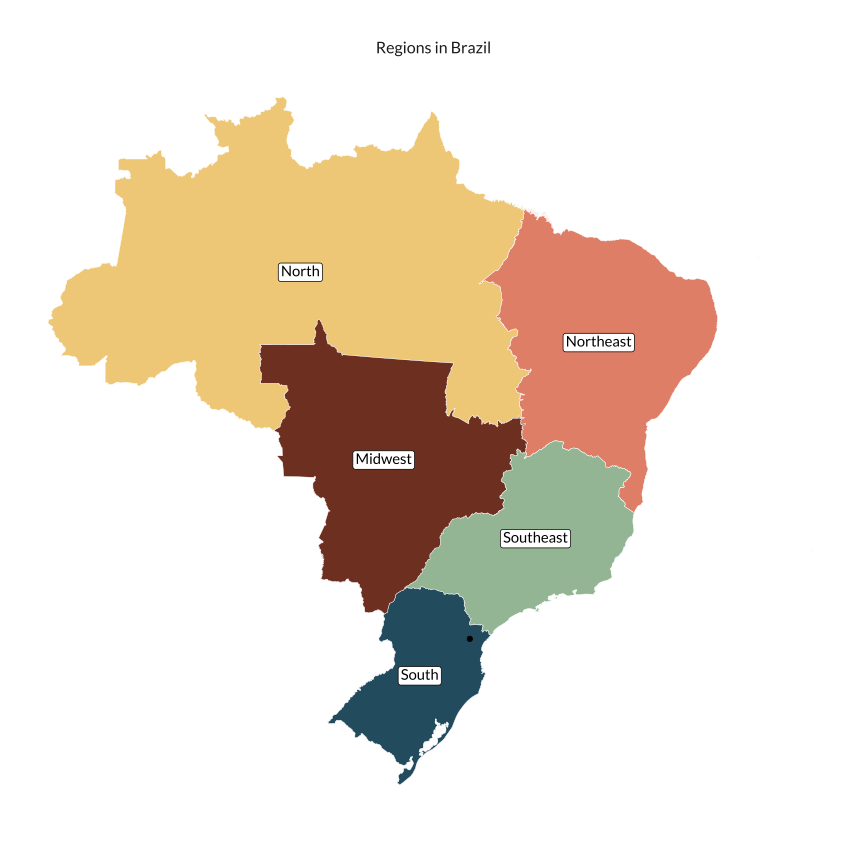
The map below shows where Paraná is in Brazil. Paraná is in the South region. As mentioned, there are 5 regions in Brazil: North, Northeast, Midwest, Southeast, and South.
```{r, cache = TRUE}
#> Define a factor variable to signal the South region
region <- region |>
  mutate(south = factor(if_else(name_region == "Sul", 1L, 0L)))

#> Get the centroid of the city of Curitiba
curitiba <- st_centroid(border)

translate <- c(
  "Norte" = "North",
  "Nordeste" = "Northeast",
  "Centro Oeste" = "Midwest",
  "Sul" = "South",
  "Sudeste" = "Southeast"
  )

region_label <- region %>%
  st_centroid() %>%
  mutate(label = stringr::str_replace_all(name_region, translate))

ggplot() +
  geom_sf(data = region, aes(fill = name_region), color = "white", lwd = 0.15) +
  geom_sf_label(
    data = region_label,
    aes(label = label),
    family = "Lato",
    label.padding = unit(0.15, "lines")
    ) +
  geom_sf(data = curitiba) +
  scale_fill_met_d("Hokusai1") +
  labs(title = "Regions in Brazil") +
  theme_vini
```
### States
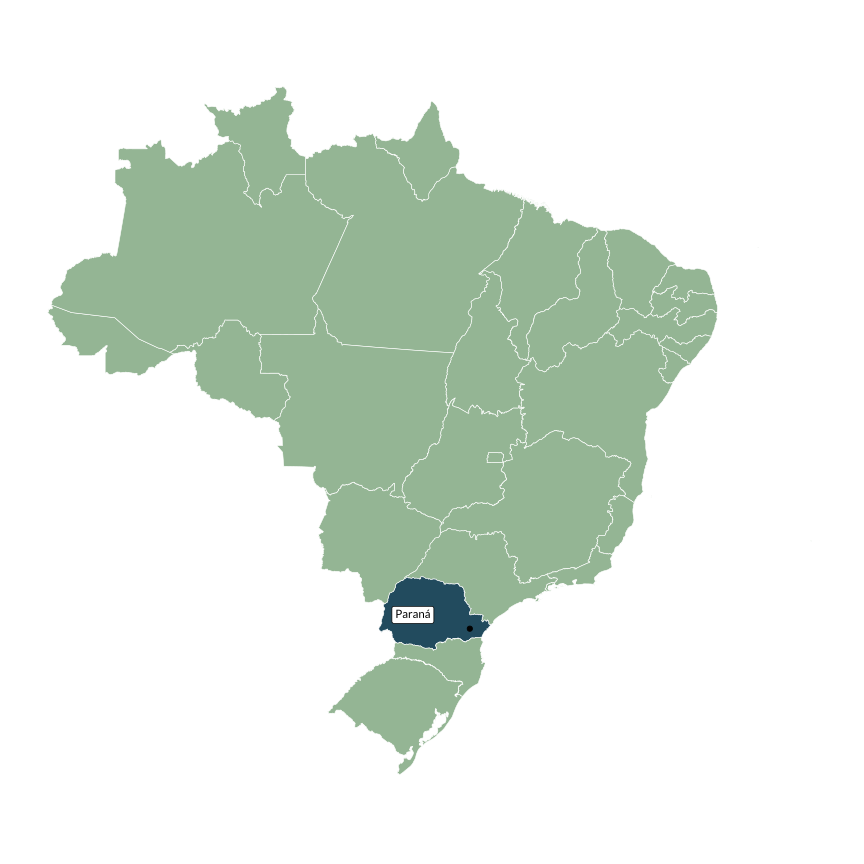
There are 26 states (equivalent to *provinces* in some countries). Distrito Federal is an importatn exception. Although it is equivalent to a state, it doesn't contain cities but administrative regions (*regiões administrativas*). The capital of Brazil, Brasília, is located within the Distrito Federal.
```{r, cache = TRUE}
state <- state |>
  mutate(parana = factor(if_else(code_state == 41, 1L, 0L)))

parana_label <- state |>
  filter(code_state == 41) |>
  st_centroid()

ggplot() +
  geom_sf(
    data = state,
    aes(fill = parana),
    color = "white"
    ) +
  geom_sf(data = curitiba) +
  geom_sf_label(
    data = parana_label,
    aes(label = name_state),
    family = "Lato",
    nudge_x = -1,
    size = 3
    ) +
  scale_fill_manual(values = met.brewer("Hokusai1", 3)[c(2, 3)]) +
  guides(fill = "none") +
  theme_vini
```
### Metropolitan Regions
```{r, cache=TRUE, include = FALSE}
metro <- metro |>
filter(name_metro == "RM Curitiba")
cities_metro <- map(metro$code_muni, read_municipality)
cities_metro <- bind_rows(cities_metro)
cities_metro <- cities_metro |>
mutate(curitiba = factor(if_else(code_muni == code_cur, 1L, 0L)))
```
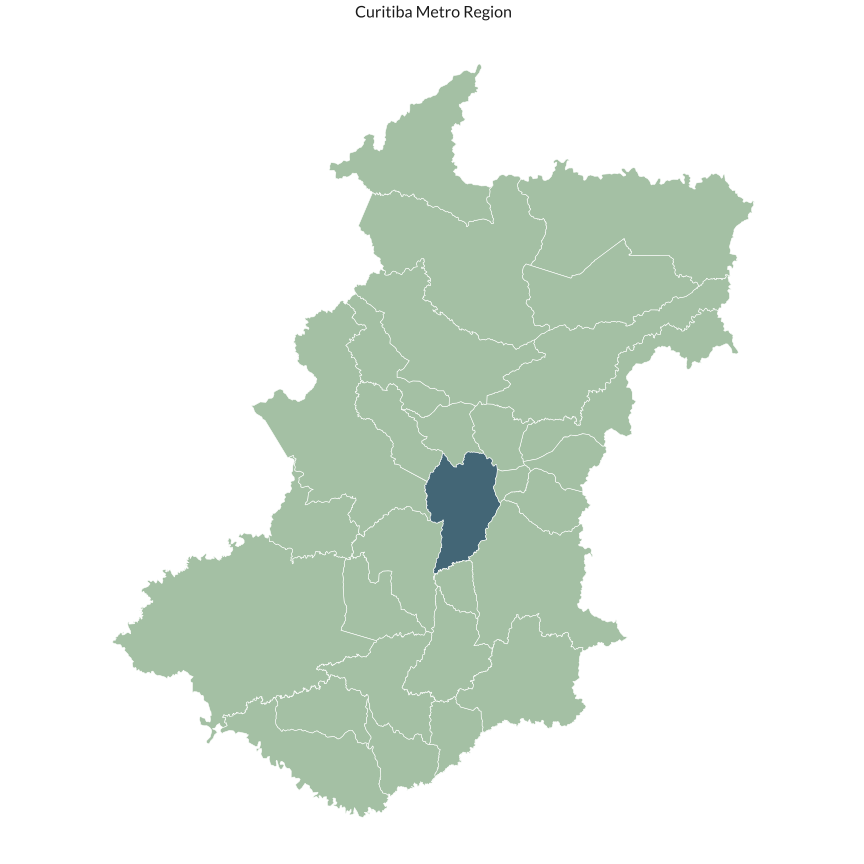
As shown above, there exist several groupings of cities in Brazil, each with a distinct goal. To keep this post simple, I will focus only on metropolitan regions. As of 2018, the metropolitan region of Curitiba contained `r nrow(cities_metro)` cities.
```{r, cache = TRUE}
ggplot() +
  geom_sf(
    data = cities_metro,
    aes(fill = curitiba),
    alpha = 0.85,
    color = "white") +
  guides(fill = "none") +
  scale_fill_manual(values = met.brewer("Hokusai1", 3)[c(2, 3)]) +
  # scale_fill_manual(values = pal[c(2, 4)]) +
  labs(title = "Curitiba Metro Region") +
  theme_vini
```
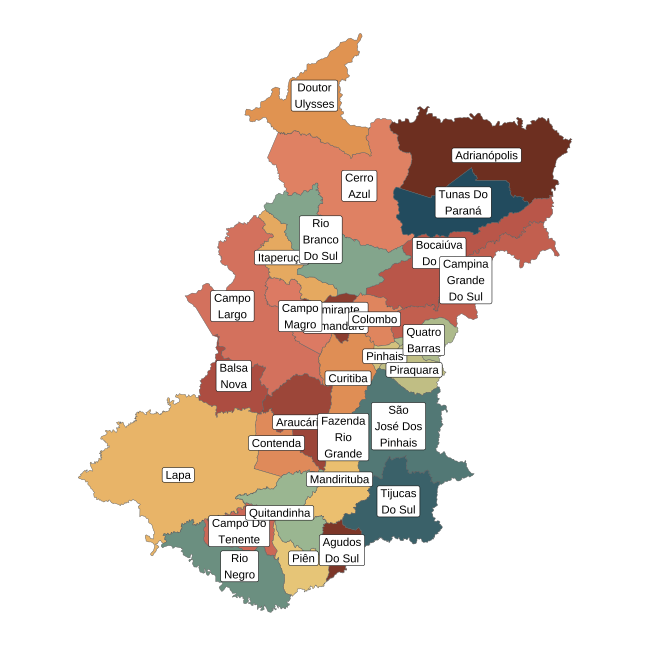
The second map below highlights the name of each city.
```{r}
cities_metro <- cities_metro %>%
  mutate(
    name_label = stringr::str_wrap(name_muni, width = 8)
  )

ggplot() +
  geom_sf(data = cities_metro, aes(fill = name_muni)) +
  geom_sf_label(
    data = cities_metro,
    aes(label = name_label),
    size = 4) +
  scale_fill_manual(values = MetBrewer::met.brewer("Hokusai1", nrow(cities_metro))) +
  theme_vini
```
### Cities
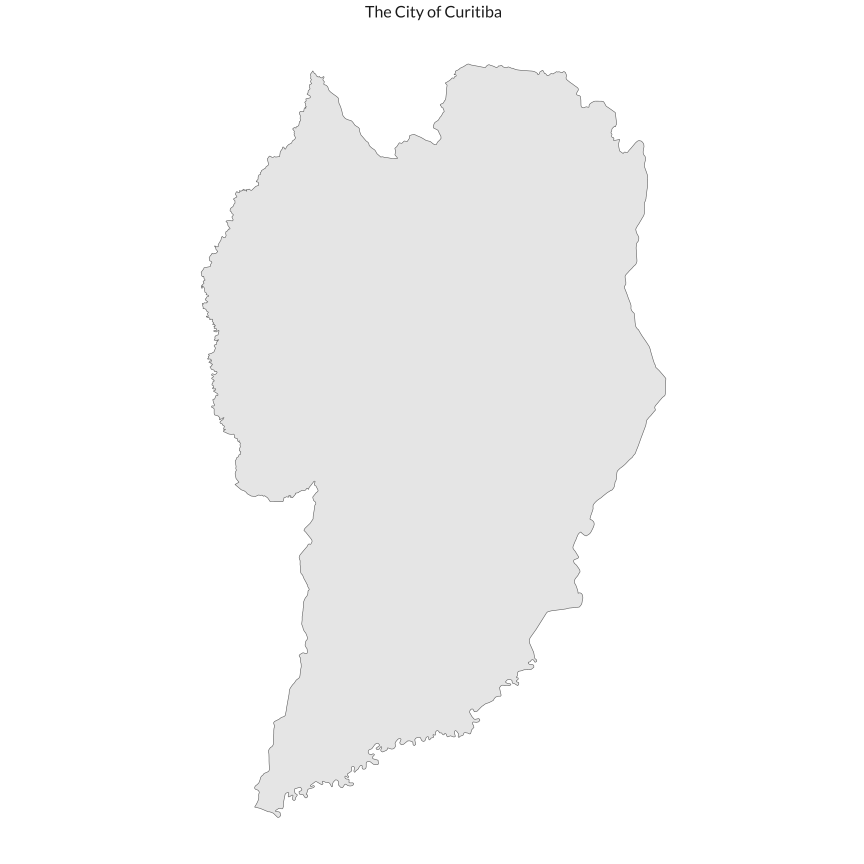
The map below shows only the city of Curitiba.
```{r, cache = TRUE}
ggplot() +
  geom_sf(data = border) +
  labs(title = "The City of Curitiba") +
  theme_vini
```
### Neighborhoods
Finally, there is an official definition of neighborhoods provided by IBGE for only some cities. Most notably, the city of São Paulo does not have an official definition of its neighborhoods. There are also districts and subdistricts but we ignore both of these for the purpose of this exposition.
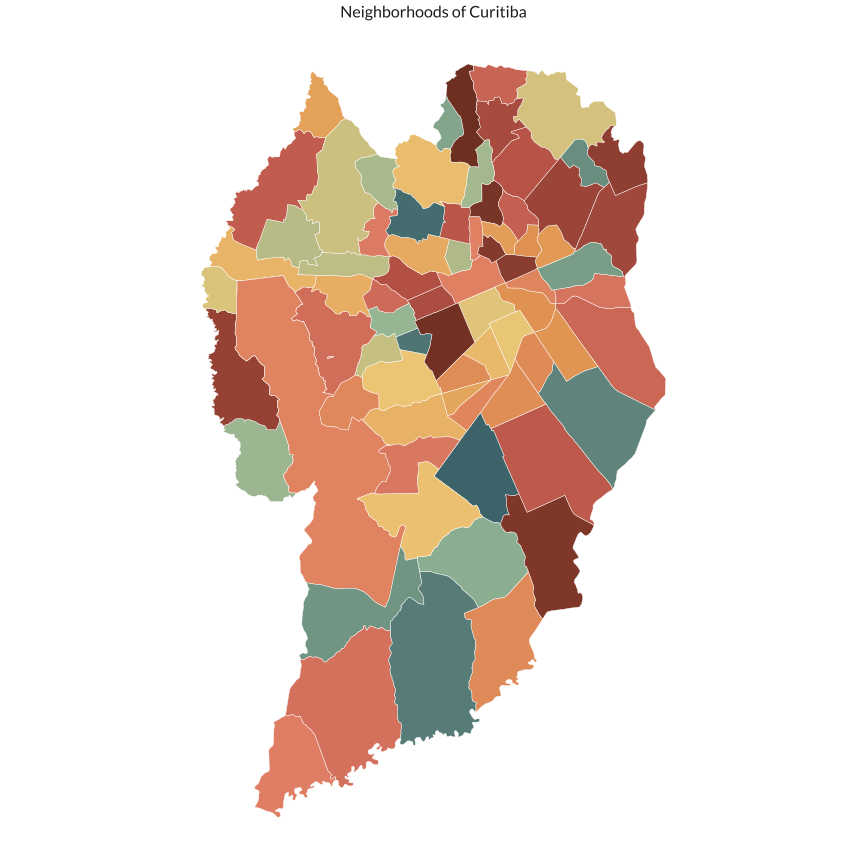
There are 78 neighborhoods in Curitiba. The map below highlights all of them.
```{r nbs-curitiba, cache = TRUE}
nb <- nb |>
  filter(code_muni == code_cur)

ggplot() +
  geom_sf(data = nb, lwd = 0.15, aes(fill = name_neighborhood), color = "white") +
  scale_fill_manual(values = met.brewer("Hokusai1", nrow(nb))) +
  labs(title = "Neighborhoods of Curitiba") +
  theme_vini
```
## Statistical Subdivisions
```{r, cache = TRUE}
cur_sg <- qs::qread(
  here::here("static/data/statistical_grid_cur.qs")
)
```
### Statistical grid
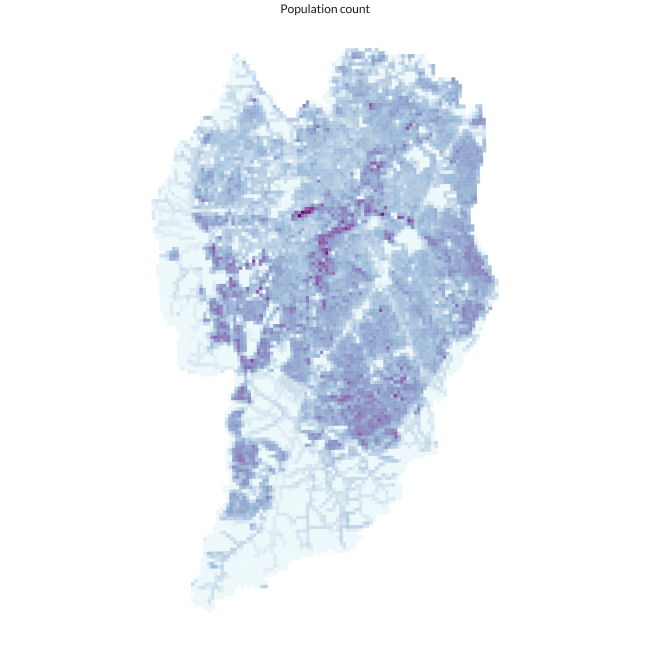
The smallest statistical subdivision available is the statistical grid. This is a varying size squared grid that offers a 200 x 200 m resolution in urban areas. It contains minimal information and is most useful as an intermediate shape in dasymetric interpolations. More specifically, it contains a population and household counts. This grid splits Curitiba into `r nrow(cur_sg)` equally sized quadrants.
The map below shows the population counts at the statistical grid level. Since the area of all quadrants is the same, this data can be interpreted as the population density at the 200 x 200 m level.
```{r}
ggplot(cur_sg) +
  geom_sf(aes(fill = sqrt(POP), color = sqrt(POP))) +
  scale_fill_distiller(palette = "BuPu", direction = 1) +
  scale_color_distiller(palette = "BuPu", direction = 1) +
  labs(title = "Population count") +
  theme_vini
```
### Census Tracts
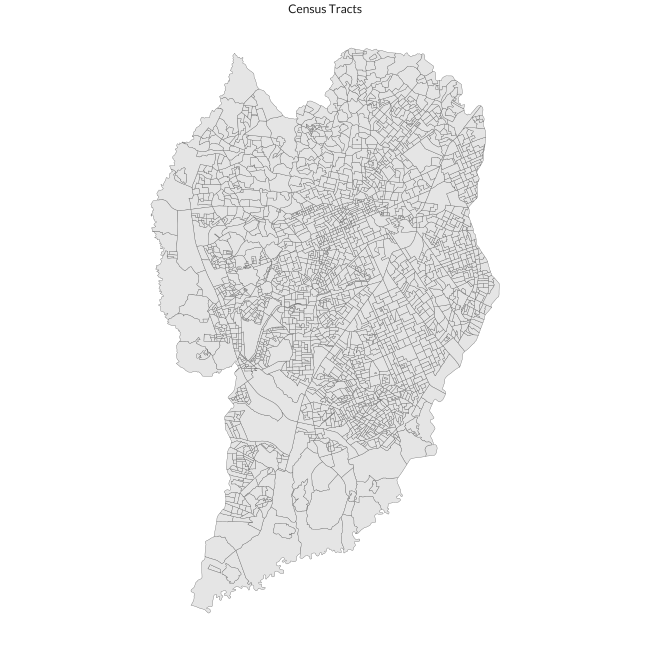
Census tracts are the strata used by IBGE in their decennial Census. The shape of each census tract usually respects administrative borders, land barriers, public spaces (parks, beaches, etc.), and follows the shape of the city blocks. Census tracts also exhibit relatively homogeneous socioeconomic and demographic characteristics. This makes census tracts a very useful statistical tool in regression analysis and classification.
The map below shows the 2395 census tracts in Curitiba.
```{r}
ggplot(ct) +
  geom_sf(lwd = 0.15) +
  labs(title = "Census Tracts") +
  theme_vini
```
It is important to note that these shapes are not temporally consistent, meaning that they changed from 1991 to 2010 and then again from 2010 to 2020. Academics have devised methods to make the census tracts compatible over time and IBGE has also announced that they will facilitate backwards compatibility.
All census tracts contain basic information on population and households (age, race, sex, family configuration, household type, income group) and some information of the infrastructure of the region (garbage, sewage, trees, etc.). Their shape tries to create areas that share similar socioeconomic and demographic characteristics.
### Weighting Areas
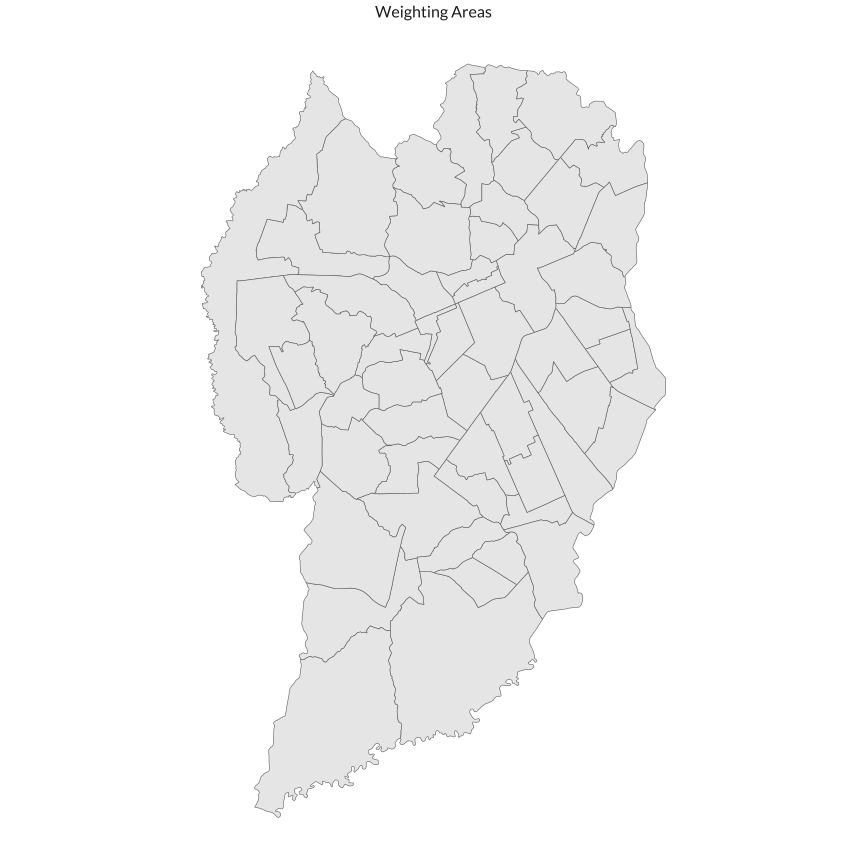
The weighting areas are an aggregation of census tracts for which there are much more detailed information. For instance, one can estimate the number of 3-bedroom apartments that are rented in a specific weighting area. Information on income, education, and housing quality are also available.
There are `r nrow(wa)` weighting areas in Curitiba.
```{r, cache = TRUE}
ggplot() +
  geom_sf(data = wa) +
  labs(title = "Weighting Areas") +
  theme_vini
```
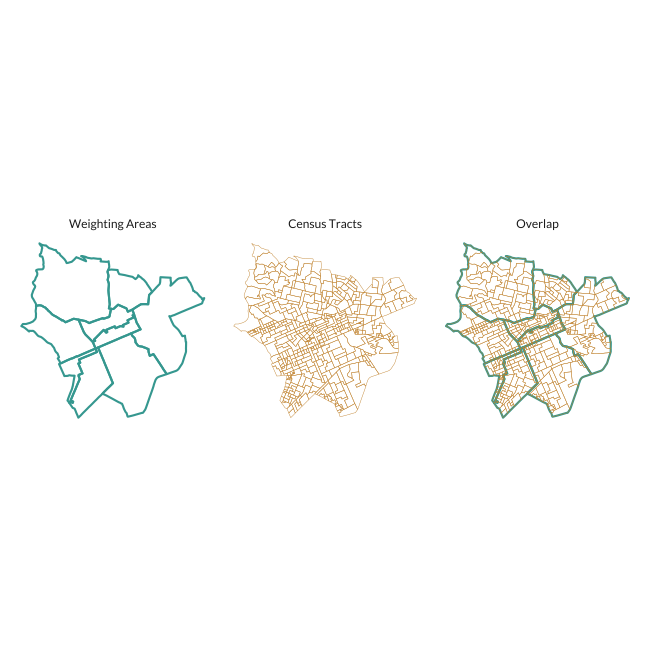
To illustrate how one can aggregate census tracts into weighting areas consider the map below that overlaps both. For this map I only take a subset of weighting areas near the city's CBD.
```{r}
#> Create a bounding box around the city's Central Business District (CBD)
cbd_bbox <- st_bbox(
  c(ymin = -25.442283, ymax = -25.421747, xmin = -49.285610, xmax = -49.256937),
  crs = 4326)
#> Create an identifier to filter after joins
cbd_bbox <- st_as_sfc(cbd_bbox)
cbd_bbox <- st_as_sf(cbd_bbox)
cbd_bbox$gid <- 1L

center <- st_coordinates(st_centroid(cbd_bbox))

cbd_wa <- wa |>
  st_transform(crs = 4326) |>
  st_join(cbd_bbox) |>
  filter(!is.na(gid))

ct_inside <- ct %>%
  st_centroid() %>%
  st_transform(crs = 4326) %>%
  st_join(cbd_wa) %>%
  filter(!is.na(code_weighting)) |>
  pull(code_tract) |>
  unique()

cbd_ct <- filter(ct, code_tract %in% ct_inside)

m1 <- ggplot() +
  geom_sf(data = cbd_wa, fill = NA, color = "#35978f", lwd = 1) +
  labs(title = "Weighting Areas") +
  theme_vini

m2 <- ggplot() +
  geom_sf(data = cbd_ct, fill = NA, color = "#bf812d") +
  labs(title = "Census Tracts") +
  theme_vini

m3 <- ggplot() +
  geom_sf(data = cbd_wa, fill = NA, color = "#35978f", lwd = 1) +
  geom_sf(data = cbd_ct, fill = NA, color = "#bf812d") +
  labs(title = "Overlap") +
  theme_vini

library(patchwork)

m1 | m2 | m3
```
## Other statistical subdivisions
There are many possible ways to bin the world into equal geometric shapes. Hexagons, squares, and triangles are the most commonly used. Below I show Uber's H3 hexagons and a native `st_make_grid()` together with the official statistical grid shown previously.
```{r map-tract-wgt, cache = TRUE}
#| fig-width: 10
#| fig-height: 8
#| fig-dev: "png"
#> Join statistical grid with CBD
cbd_sg <- cur_sg |>
  st_transform(crs = 4326) |>
  st_join(cbd_bbox) |>
  filter(!is.na(gid))

hex_id <- polyfill(cbd_bbox, res = 9)
h3_grid <- h3_to_geo_boundary_sf(hex_id)

grid_500 <- cbd_bbox |>
  st_transform(crs = 32722) |>
  st_make_grid(500, square = FALSE, flat_topped = FALSE) |>
  st_as_sf() |>
  st_transform(crs = 4326)

m1 <- ggplot(cbd_sg) +
  geom_sf() +
  ggtitle("Statistical Grid") +
  theme_vini

m2 <- ggplot(h3_grid) +
  geom_sf() +
  ggtitle("Uber H3 (res. 9)") +
  theme_vini

m3 <- ggplot(grid_500) +
  geom_sf() +
  ggtitle("st_make_grid()") +
  theme_vini

m1 | m2 | m3
```
The interactive map below illustrates the size of each hexagon in relation to the city. For simplicity I show only hexagons near the city center.
```{r}
leaflet() %>%
  addTiles() %>%
  addPolygons(data = h3_grid, weight = 1) %>%
  addProviderTiles(providers$CartoDB)
```
# Highlight Information
Shapefiles by themselves don't convey much information. We can combine these shapefiles with other geographic data to make informative chroplethic maps. The main advantage of working with official administrative or statistical shapefiles is that information is readily available.
## Neighborhoods by population density
We will make a simple map that shows the population and population density of each neighborhood in Curitiba. The first step is to get the population data from SIDRA using the `sidrar` package.
```{r population-data-sidra}
# Import population table from SIDRA
pop_nb <- sidrar::get_sidra(
  x = 1378,
  variable = 93,
  classific = "c2",
  geo = "Neighborhood",
  geo.filter = list("City" = code_cur)
)

# Clean table and make it wide
pop_nb <- pop_nb |>
  as_tibble() |>
  janitor::clean_names() |>
  select(code_neighborhood = bairro_codigo, sex = sexo, count = valor) |>
  mutate(
    sex = str_replace(sex, "Homens", "Male"),
    sex = str_replace(sex, "Mulheres", "Female")
    ) |>
  pivot_wider(
    id_cols = "code_neighborhood",
    names_from = "sex",
    values_from = "count"
    )

# Make neighborhood codes compatible
pop_nb <- pop_nb |>
  mutate(code_neighborhood = str_c(
    str_sub(code_neighborhood, 1, 7), "05", str_sub(code_neighborhood, 8, 10))
    )
# Join census table with shapefile
cur_nb <- left_join(nb, pop_nb, by = "code_neighborhood")

# Calculate population density
cur_nb <- cur_nb %>%
  st_transform(crs = 32722) %>%
  mutate(
    area = st_area(.),
    area = as.numeric(area) / 1e5,
    pop_dens = Total / area,
    pop_ntile = ntile(pop_dens, 5)
    )
# Convert back to 4326 for leaflet
cur_nb <- st_transform(cur_nb, crs = 4326)
```
After cleaning and merging the datasets we can make an interactive map using `leaflet`.
```{r nb-leaflet-map}
# Color palette and bins
bins <- quantile(cur_nb$pop_dens, probs = seq(0.2, 0.8, 0.2))
bins <- c(0, bins, max(cur_nb$pop_dens))
pal <- colorBin(
  palette = as.character(met.brewer("Hokusai2", 5)),
  domain = cur_nb$pop_dens,
  bins = bins)

# Labels
labels <- sprintf(
  "<strong>%s</strong><br/> %s people <br/> %g people / ha<sup>2</sup>",
  cur_nb$name_neighborhood,
  format(cur_nb$Total, big.mark = "."),
  round(cur_nb$pop_dens, 1)
  )

labels <- lapply(labels, htmltools::HTML)

# Center of the map for zoom
center <- st_coordinates(st_centroid(border))

leaflet(cur_nb) %>%
  addTiles() %>%
  addPolygons(
    weight = 2,
    color = "white",
    fillColor = ~pal(pop_dens),
    fillOpacity = 0.8,
    highlightOptions = highlightOptions(
      color = "gray20",
      weight = 10,
      fillOpacity = 0.8,
      bringToFront = TRUE),
    label = labels,
    labelOptions = labelOptions(
      style = list("font-weight" = "normal", "font-family" = "Fira Code")
    )
  ) %>%
  addLegend(
    pal = pal,
    values = ~pop_dens,
    title = "Densidade Pop.",
    position = "bottomright"
  ) %>%
  addProviderTiles(providers$CartoDB) %>%
  setView(lng = center[1], lat = center[2], zoom = 11)
```
## Interpolation
When using different shapefiles it's necessary to interpolate data from the "source" shapefile to the desired "target" shapefile. For instance, we might have the total number of apartments by census tract (source) but desire to have the same number by H3 hexagons (target). In this example, the number of apartments would be our *target variable* that should be interpolated from one shape to another.
For simplicity sake, I show how to make a simple areal interpolation from Curitiba's census tracts to a hexagonal H3 grid.
### Import data
I import census tract level socioeconomic data using `censobr`. I retrieve the total number of houses, apartments, and some information on housing ownership (i.e. rented, owned, etc.).
```{r import-hh-census}
library(censobr)

hh <- read_tracts(dataset = "Domicilio", showProgress = FALSE)

cur_domicilios <- hh |>
  filter(code_muni == code_cur) |>
  select(code_tract, domicilio01_V002:domicilio01_V011) |>
  collect()

col_names <- c(
  "hh_total", "hh_house", "hh_cndm", "hh_apt",
  "hh_owned1", "hh_owned2", "hh_rented", "hh_cedido1", "hh_cedido2", "hh_other"
)

names(cur_domicilios)[-1] <- col_names

cur_census <- left_join(ct, cur_domicilios, by = "code_tract")
```
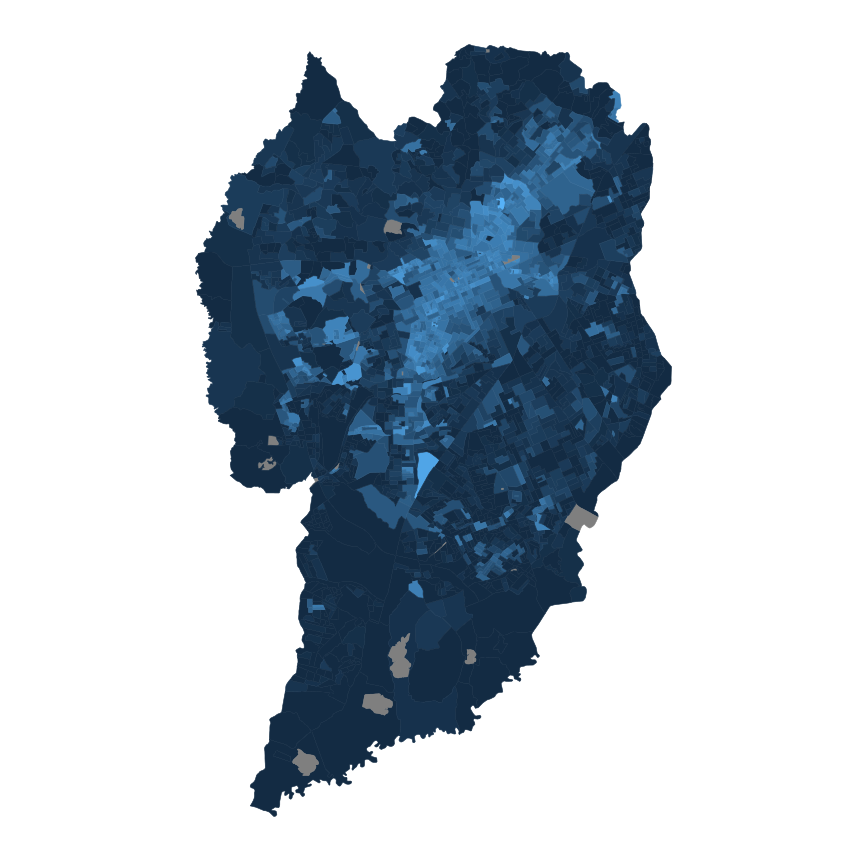
The map below shows the total number of apartments in Curitiba by census tract.
```{r map-ct-apto}
ggplot(cur_census) +
  geom_sf(aes(fill = sqrt(hh_apt), color = sqrt(hh_apt))) +
  theme_vini
```
### Interpolation
To interpolate we use the `areal` package. It requires the shapefile to be inputed in a planar projection.
```{r interpolate-ct-h3}
index <- h3::polyfill(border, res = 9)
h3_grid <- h3::h3_to_geo_boundary_sf(index)

h3_grid <- st_transform(h3_grid, crs = 31984)
cur_census <- st_transform(cur_census, crs = 31984)

#> Compute areal interpolation
interp <- aw_interpolate(
  h3_grid,
  tid = h3_index,
  source = cur_census,
  sid = "code_tract",
  weight = "sum",
  extensive = "hh_apt"
)

interp <- st_transform(interp, crs = 4326)
```
### Results
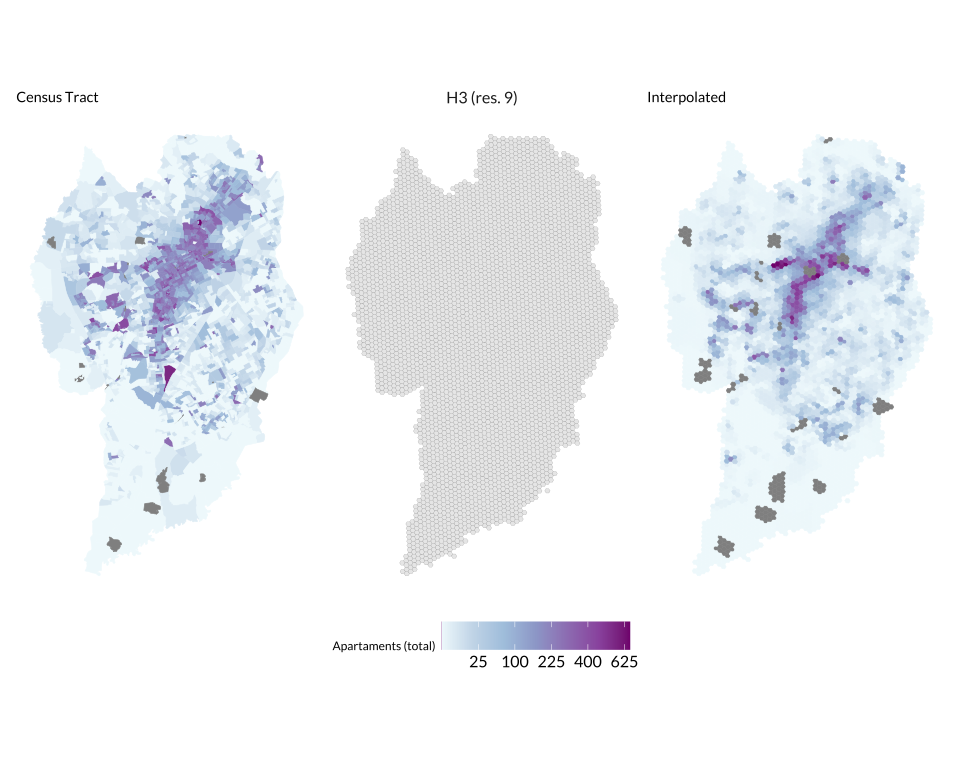
Finally, the panel below shows the result of the interpolation.
```{r map-interpolated}
#| fig-width: 10
#| fig-height: 8
m1 <- ggplot(cur_census) +
  geom_sf(aes(fill = sqrt(hh_apt), color = sqrt(hh_apt))) +
  ggtitle("Census Tract") +
  scale_fill_distiller(
    name = "Apartaments (total)",
    palette = "BuPu",
    breaks = c(5, 10, 15, 20, 25),
    labels = c(5, 10, 15, 20, 25)^2,
    direction = 1) +
  scale_color_distiller(
    name = "Apartaments (total)",
    palette = "BuPu",
    breaks = c(5, 10, 15, 20, 25),
    labels = c(5, 10, 15, 20, 25)^2,
    direction = 1) +
  ggthemes::theme_map(base_family = "Lato")

m2 <- ggplot(h3_grid) +
  ggtitle("H3 (res. 9)") +
  geom_sf(lwd = 0.05) +
  theme_vini

m3 <- ggplot(interp) +
  geom_sf(aes(fill = sqrt(hh_apt), color = sqrt(hh_apt))) +
  scale_fill_distiller(
    name = "Apartaments (total)",
    palette = "BuPu",
    breaks = c(5, 10, 15, 20, 25),
    labels = c(5, 10, 15, 20, 25)^2,
    direction = 1) +
  scale_color_distiller(
    name = "Apartaments (total)",
    palette = "BuPu",
    breaks = c(5, 10, 15, 20, 25),
    labels = c(5, 10, 15, 20, 25)^2,
    direction = 1) +
  ggtitle("Interpolated") +
  ggthemes::theme_map(base_family = "Lato")

panel <- m1 | m2 | m3

panel + plot_layout(guides = "collect") &
  theme(
    legend.position = "bottom",
    legend.justification = 0.5,
    legend.key.size = unit(0.75, "cm"),
    legend.key.width = unit(1, "cm"),
    legend.text = element_text(size = 12),
    text = element_text(family = "Lato")
    )
```